Log Entry
Elastic Async Limits for Queueable and Future Jobs
Elastic async limits are one of those features that sound boring until you have lived through the alternative.
The alternative is a brick wall.
Your org is processing jobs normally, a data load or integration spike lands, and then suddenly Queueable and future work starts failing because the daily async Apex limit is exhausted.
Summer '26 gives you a better failure shape: more headroom, then throttling.
That is a good trade.
It is not free throughput.
Quick snapshot
- What: Queueable Apex and future method jobs can be enqueued up to a new elastic limit.
- How much: the elastic limit is twice the size of your org's licensed daily async limit.
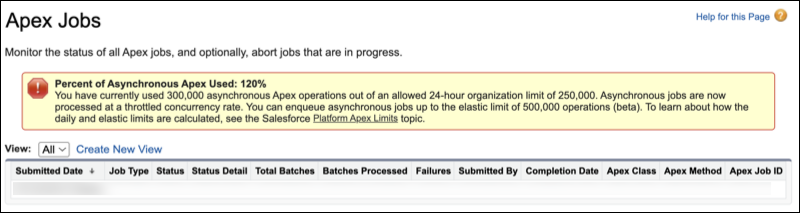
- What changes after the licensed limit: jobs over the licensed daily limit are processed at a throttled rate.
- Where to enable it: Setup -> Apex Settings -> Use elastic limits for asynchronous Apex jobs (Beta).
- How to monitor it: Apex Jobs in Setup, or
System.OrgLimits.getMap()in Apex. - Important: this is beta, and it applies to Queueable and future method jobs.

Source: Salesforce Summer '26 release notes.
My short version:
Elastic limits stop the cliff edge. They do not make inefficient async architecture cheap.
What actually doubles
If your licensed daily async limit is 250,000, the elastic ceiling is 500,000.
That does not mean you now have 500,000 normal-speed jobs.
It means:
- jobs can continue being accepted after the licensed daily limit
- the org gets a buffer instead of abrupt failures
- work above the licensed limit is throttled
So this helps most with spikes: imports, campaign bursts, integrations catching up, temporary retry storms, month-end processing.
It helps less with a system that burns too many async jobs every normal day.
What absolutely does not become free
Elastic limits do not remove:
- per-transaction governor limits
- CPU limits
- SOQL and DML limits
- heap limits
- callout limits
- row locking problems
- external API rate limits
- bad retry behaviour
- unbulkified Queueables
If one user action creates 50 Queueables and you do that all day, elastic limits just give the mess more runway.
That is still useful in an emergency. It is not a design target.
Example 1: Read async usage in Apex
In API 67.0+, Salesforce exposes org limit entries for daily async usage, elastic async usage, and processed async jobs.
public with sharing class AsyncLimitStatus {
public Integer licensedLimit;
public Integer elasticLimit;
public Integer processed;
public Decimal licensedUsagePercent;
public Decimal elasticUsagePercent;
public Decimal overLicensedByPercent;
public static AsyncLimitStatus current() {
Map<String, System.OrgLimit> limits = System.OrgLimits.getMap();
System.OrgLimit licensed = limits.get('DailyAsyncApexExecutions');
System.OrgLimit elastic = limits.get('DailyAsyncApexElasticExecutions');
System.OrgLimit processed = limits.get('DailyAsyncApexProcessed');
AsyncLimitStatus status = new AsyncLimitStatus();
status.licensedLimit = licensed == null ? 0 : licensed.getLimit();
status.elasticLimit = elastic == null ? status.licensedLimit : elastic.getLimit();
status.processed = processed != null
? processed.getValue()
: licensed == null ? 0 : licensed.getValue();
status.licensedUsagePercent = percent(status.processed, status.licensedLimit);
status.elasticUsagePercent = percent(status.processed, status.elasticLimit);
Decimal overLicensed = status.licensedUsagePercent - 100;
status.overLicensedByPercent = overLicensed > 0 ? overLicensed : 0;
return status;
}
private static Decimal percent(Integer used, Integer limitValue) {
if (limitValue == null || limitValue == 0) {
return 0;
}
return ((Decimal) used / (Decimal) limitValue) * 100;
}
}
That gives you the number you actually want for operational decisions:
licensedUsagePercent: how close are we to the normal daily wall?overLicensedByPercent: how far into elastic territory are we?elasticUsagePercent: how close are we to the new hard ceiling?
This is where the feature gets interesting. You can stop treating the async limit as a surprise and start treating it as a signal.
Example 2: Delay low-priority Queueables when usage is high
Queueable Apex has a useful delay overload: System.enqueueJob(queueable, delayInMinutes).
That delay can be 0 to 10 minutes.
So when the org is healthy, run normally. When the org is hot, add friction to low-priority jobs.
public enum AsyncPriority {
HIGH,
NORMAL,
LOW
}
public with sharing class AsyncDelayPolicy {
public static Integer delayMinutesFor(AsyncPriority priority) {
AsyncLimitStatus status = AsyncLimitStatus.current();
if (priority == AsyncPriority.HIGH) {
return 0;
}
if (status.licensedUsagePercent < 80) {
return 0;
}
if (status.licensedUsagePercent < 100) {
return priority == AsyncPriority.LOW ? 2 : 0;
}
Integer overBy = status.overLicensedByPercent.intValue();
if (priority == AsyncPriority.NORMAL) {
return Math.min(10, 2 + (overBy / 25));
}
return Math.min(10, 5 + (overBy / 10));
}
}
Then use it at enqueue time.
Integer delay = AsyncDelayPolicy.delayMinutesFor(AsyncPriority.LOW);
System.enqueueJob(new RecalculateCustomerScoreQueueable(accountIds), delay);
That is the kind of strategy I like for this feature.
It does not pretend the limit disappeared. It lets important work keep moving while low-priority work politely stops elbowing everyone else in the queue.
Example 3: A priority-aware enqueue wrapper
Most teams should not scatter limit policy everywhere.
Create one small wrapper.
public with sharing class AsyncDispatcher {
public static Id enqueue(Queueable job, AsyncPriority priority) {
Integer delay = AsyncDelayPolicy.delayMinutesFor(priority);
return System.enqueueJob(job, delay);
}
}
Callers then make the business decision, not the limit decision.
AsyncDispatcher.enqueue(
new SendCustomerReceiptQueueable(receiptIds),
AsyncPriority.HIGH
);
AsyncDispatcher.enqueue(
new RefreshSearchIndexQueueable(recordIds),
AsyncPriority.LOW
);
That difference matters.
A receipt email is customer-visible. A search index refresh is often allowed to lag by a few minutes during a spike.
Elastic limits plus queueable delay let you encode that difference.
Example 4: Reject, defer, or compress when elastic usage is too high
Once you are deep into elastic usage, delaying low-priority jobs might not be enough.
At that point I would stop enqueuing some work entirely and persist it for later.
public with sharing class AsyncAdmissionControl {
public static Boolean shouldAccept(AsyncPriority priority) {
AsyncLimitStatus status = AsyncLimitStatus.current();
if (status.elasticUsagePercent < 85) {
return true;
}
return priority == AsyncPriority.HIGH;
}
}
Usage:
if (AsyncAdmissionControl.shouldAccept(AsyncPriority.LOW)) {
AsyncDispatcher.enqueue(
new RefreshSearchIndexQueueable(recordIds),
AsyncPriority.LOW
);
} else {
Deferred_Work__c work = new Deferred_Work__c(
Work_Type__c = 'RefreshSearchIndex',
Payload__c = JSON.serialize(recordIds),
Run_After__c = System.now().addHours(1)
);
insert work;
}
That is the "avoid running into a brick wall" pattern.
The system does not keep blindly throwing Queueables into a hot org. It notices the org is hot and changes behaviour.
Example 5: Compress duplicate low-priority work
This is where teams can get clever.
If 20 updates happen to the same account in five minutes, you probably do not need 20 separate low-priority recalculation jobs.
Before:
for (Account accountRecord : Trigger.new) {
System.enqueueJob(new RecalculateCustomerScoreQueueable(accountRecord.Id));
}
After:
Set<Id> accountIds = new Map<Id, Account>(Trigger.new).keySet();
AsyncDispatcher.enqueue(
new RecalculateCustomerScoreQueueable(accountIds),
AsyncPriority.LOW
);
Better again: persist pending work by key and let one scheduled or queueable worker claim batches.
for (Id accountId : accountIds) {
pendingWork.add(new Pending_Async_Work__c(
Work_Key__c = 'CustomerScore:' + accountId,
Record_Id__c = accountId,
Priority__c = 'Low',
Run_After__c = System.now().addMinutes(
AsyncDelayPolicy.delayMinutesFor(AsyncPriority.LOW)
)
));
}
upsert pendingWork Work_Key__c;
That upsert is the trick.
Repeated changes collapse into one pending work item per account. Elastic limits help with spikes, but compression reduces the spike in the first place.
Where this helps
This is a good fit for:
- non-urgent recalculations
- search indexing
- enrichment jobs
- external sync retries
- cache refreshes
- notification digest work
- document generation that does not need to happen immediately
These jobs can usually wait a few minutes without anyone caring.
That makes them perfect candidates for delay and admission control.
Where it just delays pain
This feature will not fix:
- Queueables created inside loops
- retries with no backoff
- callouts to an already rate-limited service
- one record update spawning several independent async jobs
- nightly jobs that always consume the whole daily limit
- async work that should have been bulk API, batch Apex, or platform-event driven
The dangerous failure mode is psychological: "we have twice the limit now."
No. You have a shock absorber.
You still need brakes.
Queueable beats future for control
The feature covers Queueable and future jobs, but the smarter queuing strategies are much easier with Queueable.
Future methods are fine for simple fire-and-forget work, but they are blunt. Queueables give you:
- richer payloads
- job IDs
- chaining patterns
- transaction finalizers
- delay at enqueue time
- cleaner testing seams
If you care about priority, delay, backoff, and operational control, Queueable is usually the better shape.
I would not rewrite every @future method just because this beta exists. I would rewrite the ones that are part of a known high-volume path.
A practical policy
If I were adding this to a busy org, I would start with this:
0-80%of licensed daily limit: enqueue normally80-100%: delay low-priority Queueables by 2 minutes100-125%: delay normal work slightly, delay low-priority work more125%+: accept high-priority work only; defer or compress low-priority work85%+of elastic limit: stop creating optional async work
The exact numbers are less important than the posture.
Do not wait for failure. Start shaping traffic while the org still has room to breathe.
Final take
Elastic async limits are great because they turn a hard cliff into a slope.
That gives you time to recover from spikes, keep critical workflows moving, and avoid surprise limit exceptions during ugly days.
The best use is not "enqueue twice as much stuff."
The best use is adaptive queuing: measure how hot the org is, keep high-priority jobs moving, delay low-priority Queueables, and collapse duplicate work before it becomes noise.
That is how you use the extra runway without pretending the runway is infinite.